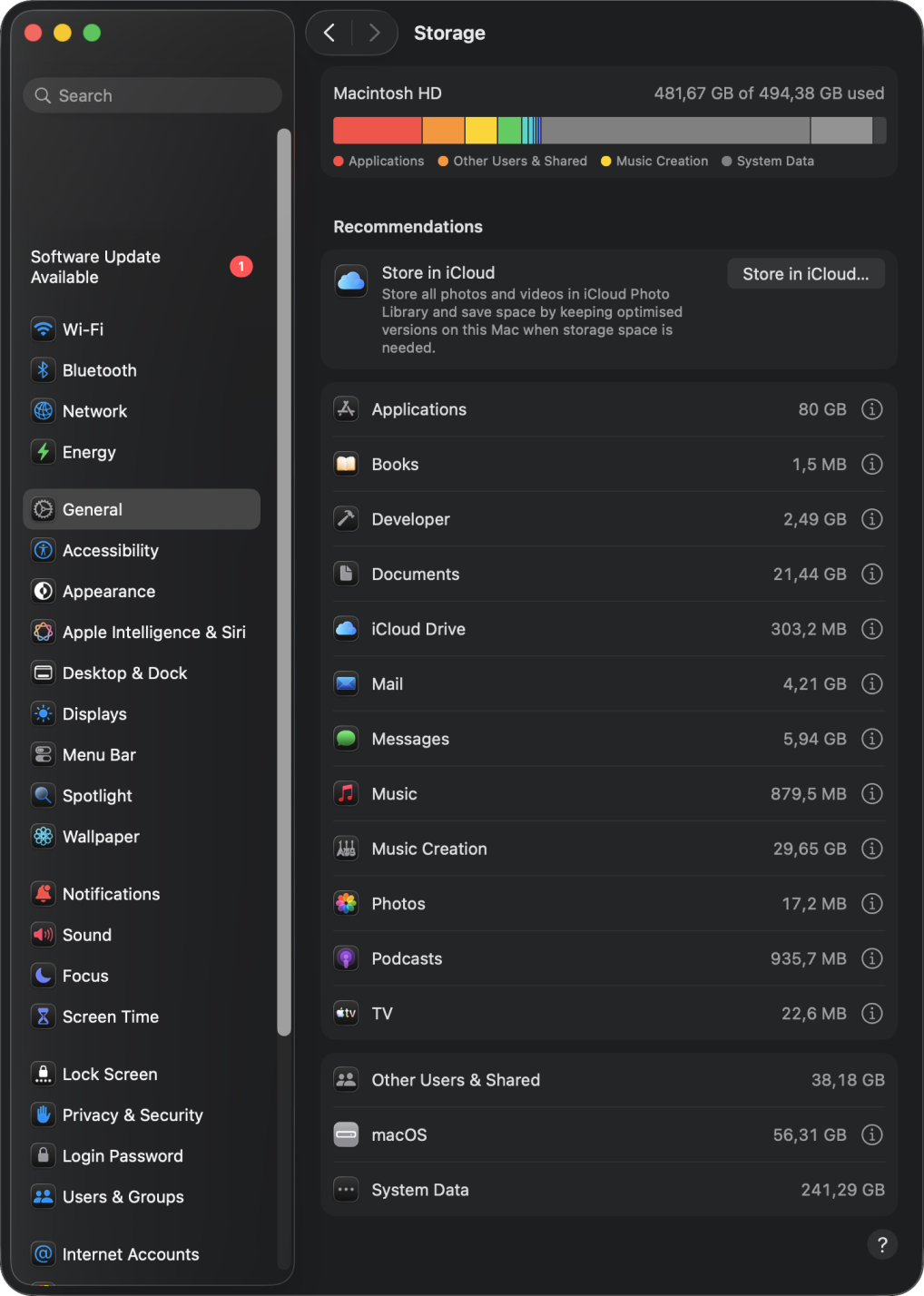
Storage settings shows 200 GB used — but the disk is almost full.
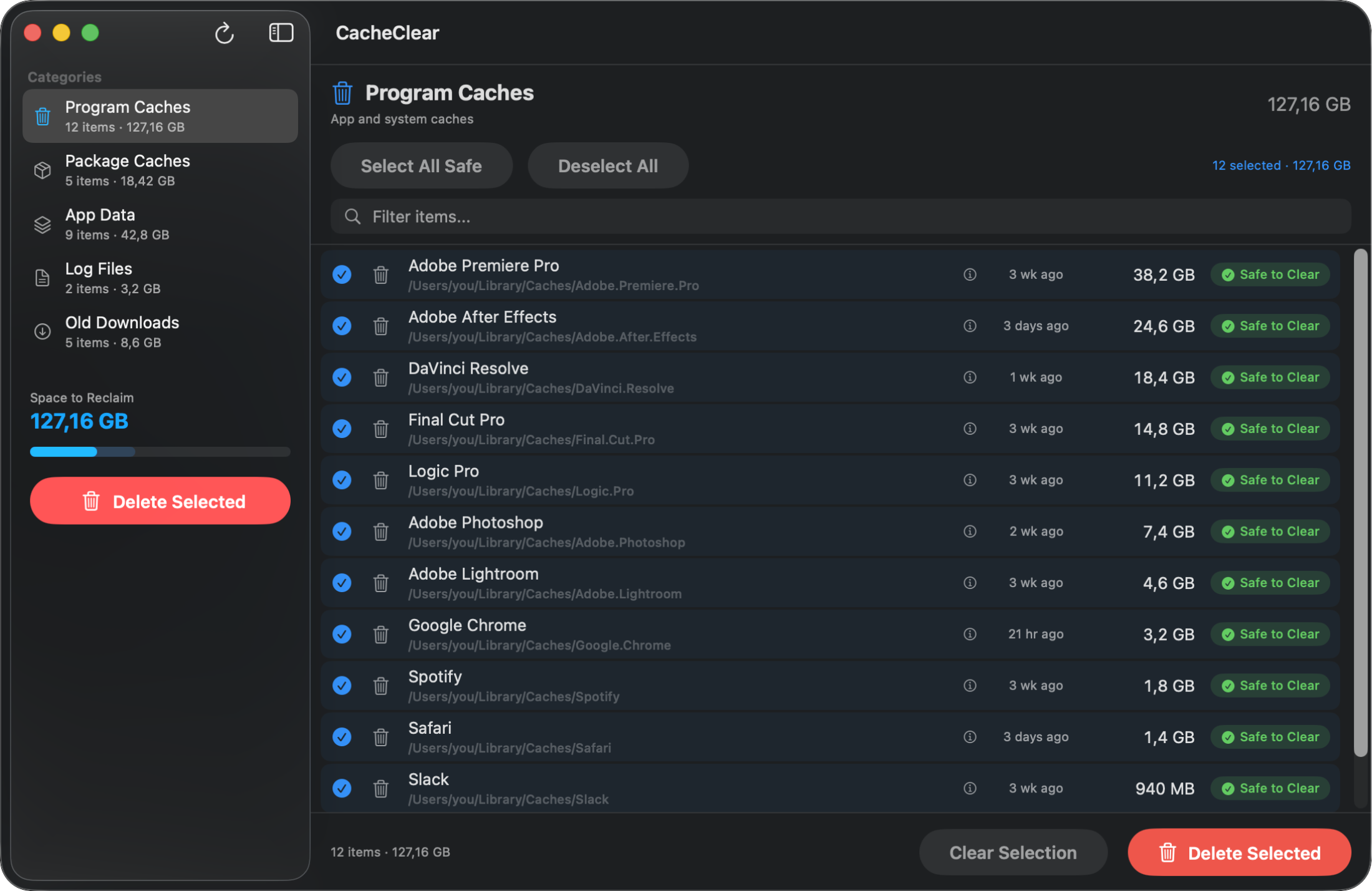
CleanDisk finds hidden files and lets you remove them safely.
Hidden caches, browser leftovers, and creative app bloat pile up silently. CleanDisk finds and removes them safely — so you get your space back.
Storage settings shows 200 GB used — but the disk is almost full.
CleanDisk finds hidden files and lets you remove them safely.
Scan is always free. Pay to delete.
Cancel anytime
Best value
CleanDisk knows what's safe to delete — and what isn't.
Every item is marked Safe, Review, or Protected. You always know what you're deleting — no guesswork.
Full system scan in under a minute. See exactly how much space you can reclaim before doing anything.
One click to select everything that's safe to delete. Review items are left untouched.
Click any item to see exactly what it is, why it's safe (or not), and what happens if you delete it.
Premiere, After Effects, Photoshop, DaVinci Resolve, Final Cut, Logic Pro — finds them all.
Built with SwiftUI for Tahoe. No Electron, no web views — just a fast, beautiful, native app.
Five categories of space-wasting files, scanned in seconds.
App & system caches
npm, Homebrew, Xcode
Support files & blobs
System & app logs
Files older than 30d
Focused on cache. Priced for humans.
| Feature | CleanDisk | CleanMyMac | DaisyDisk | OnyX |
|---|---|---|---|---|
| Price | $19.99/yr | $39.95/yr | $9.99 | Free |
| Safety labels | ✅ | — | — | — |
| Cache-focused scan | ✅ | Partial | — | Partial |
| Native macOS | ✅ | ✅ | ✅ | ✅ |
| Free scan | ✅ | Limited | ✅ | ✅ |
| Disk visualization | — | Basic | ✅ | — |
System Data is macOS's catch-all category for caches, logs, Time Machine snapshots, Spotlight indexes, and other temporary files. It can grow to 50–200+ GB over time. Unlike app storage, Apple doesn't provide a built-in way to manage it — which is exactly what CleanDisk does.
Most cache files are safe to delete — apps recreate them as needed. However, some caches contain login tokens or preferences you might want to keep. CleanDisk labels every item as Safe, Review, or Protected so you always know what you're deleting before you do it.
Based on scans of 50 Macs, the average user had 42 GB of reclaimable cache files. Developers and creative professionals often have 80–150 GB. The free scan shows you exactly how much space you can get back before you do anything.
The scan is completely free — no signup, no email required. You can see exactly what's taking up space at no cost. Deleting files requires a subscription: $2.99/month or $19.99/year.
CleanMyMac is a full system utility ($39.95/year) that does malware scanning, app updates, and more. CleanDisk is focused purely on finding and removing cache files — it does one thing well. It's native SwiftUI (not Electron), cheaper ($2.99/month), and labels every item with safety ratings so you never delete something important.
Yes. CleanDisk is a universal binary that runs natively on both Apple Silicon (M1, M2, M3, M4) and Intel Macs. It requires macOS 15 (Tahoe) or later.